
How to Add Schema Markup to Your Website
This guide will help you add schema markup provided by Paige to your website
Step 1: Go to the Automation tab in Paige, then click on Website & AI SEO
Step 2: Scroll to bottom of page to find schema markup code and copy it.
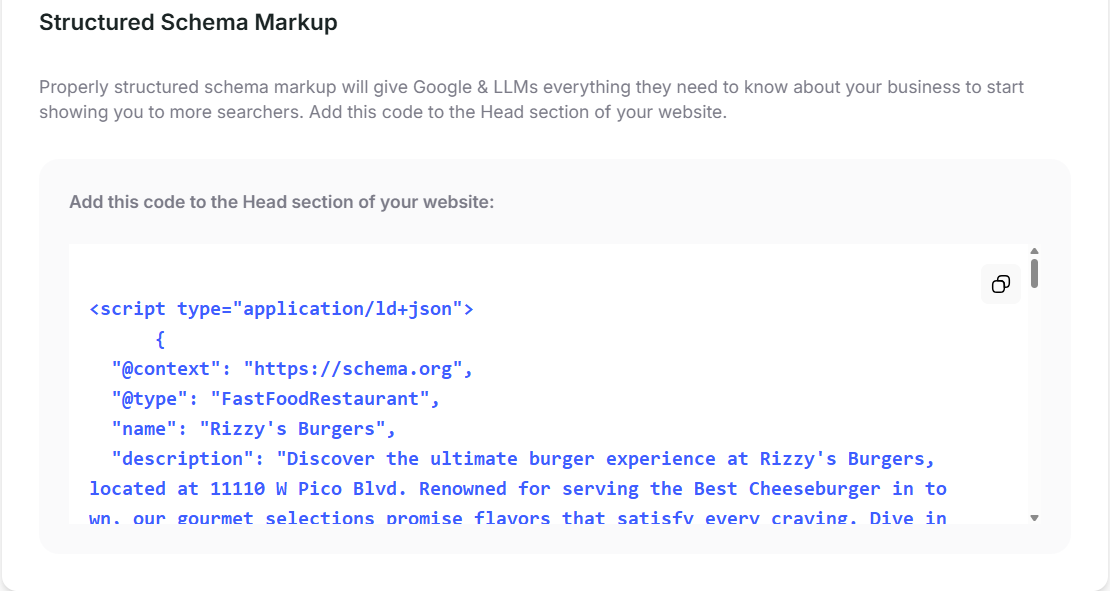
Step 3: Add code to your website
Squarespace:
- Log into Squarespace
- Go to Settings → Advanced → Code Injection.
- In the Header field, paste the JSON-LD schema snippet.
- Save changes.
- Refresh your live site to confirm it's injected.
WordPress:
Method A — Using the Theme Customizer (Easiest)
-
Log into WordPress.
-
Go to Appearance → Customize.
-
Look for a panel named Additional CSS/JS, Header Scripts, or Custom Code (varies by theme; many themes like Astra, Kadence, and Elementor have this).
-
Paste the JSON-LD snippet into the Header Scripts or Head section.
-
Click Publish.
Method B — Using a Code Injection Plugin
Use plugins like: • Header Footer Code Manager (HFCM) • Insert Headers and Footers • WPCode
Steps:
- Install the plugin.
- Create a New Snippet → choose JavaScript / HTML.
- Set Location = Header.
- Paste your JSON-LD snippet.
- Save & activate.
Wix:
Method A — Using Wix “Custom Code”
- Go to your Wix dashboard.
- Click Settings.
- Scroll to Advanced → Custom Code.
- Click + Add Custom Code.
- Paste the JSON-LD snippet.
- Set Place Code in: Head.
- Set it to load on All Pages or select a specific page.
- Click Apply.
Method B — Wix Studio (if using Studio editor)
- Go to Settings → Custom Code.
- Add new code.
- Select Head.
- Paste your JSON-LD snippet.
- Save & publish.
Shopify:
Method A — Theme Editor (Online Store 2.0)
- Go to Online Store → Themes → Edit Code.
- Open layout/theme.liquid.
- Locate the
<head>tag. - Right before the closing
</head>tag, paste your JSON-LD snippet. - Save the file.
Method B — For Only ONE Page (e.g., FAQ page)
-
Go to Templates.
-
Open the liquid template for that page (e.g.,
page.faq.jsonorpage.faq.liquid). -
Insert the JSON-LD snippet inside
{% block head %}(if theme supports it) or right before the first<section>tag. -
Save.
Weebly:
- Log in to Weebly.
- Click Settings in the top menu.
- Go to SEO.
- Inside Header Code, paste your JSON-LD snippet.
- Save & publish your site.
Didn't find what you needed?
Tell us what's missing or unclear and we'll improve this article.
Still need help?
Our team is available to help you with any questions about your local SEO setup. Just log in to Paige and start a live chat.